


Ceylon Remittance Laxmi Remit Bayan Remit

Ceylon Remittance · Top-Up Guide

Six ways to put cash into your account in Japan

Pick whichever is closest to you — a konbini, a bank counter, or your own phone. Every method below shows the exact steps, the fee if one applies, and how long it takes to land.

01

Lawson Deposit Card

¥300 fee ~5 min
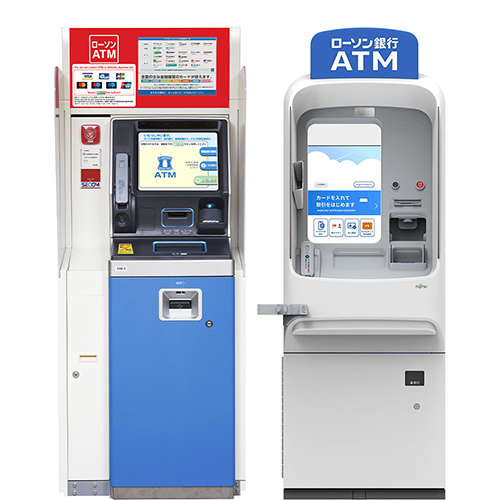
Lawson ATM machine
Lawson ATM

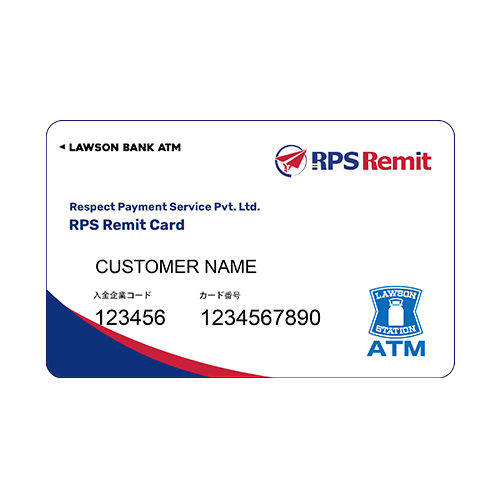
RPS Remit deposit card

Your RPS Remit card

  1. Visit any Lawson store and find the Lawson ATM machine.
  2. Insert the card and select Deposit.
  3. Put the money into the machine and press OK.
  4. Confirm the amount.
  5. After the deposit, you'll receive a receipt.

Within 5 minutes, the balance will show in the Application. If not, refresh, or close and reopen the app and log in again.

If it still doesn't work, call our hotline after 10 minutes have passed since the deposit.

The deposit charge is 300 yen per transfer.
02

MUFG Bank Transfer

Fee varies Manual review
  1. Go to any bank in Japan.
  2. Transfer directly via ATM or online banking to our MUFG Bank account:
    Transfer to
    MUFG Bank 三菱UFJ銀行 (005)
    Katsushika Branch 葛飾支店 (354)
    No. 0228341 — Respect Payment Service Pvt. Ltd.
  3. Take a photo or screenshot of the transfer receipt.
  4. Go to the remittance Application.
  5. Log in and select Top-Up money.
  6. Select the Bank/Remit card option.
  7. Select MUFG Bank.
  8. Enter the transfer amount and attach the receipt photo.
  9. Press "I have transferred the money."

Our team checks your receipt and bank account to confirm the transaction, then approves it. This can take longer on weekends and after working hours on weekdays.

Deposit fee varies by bank, amount, and method of deposit.
03

Deposit by Loppi Machine

~5 min
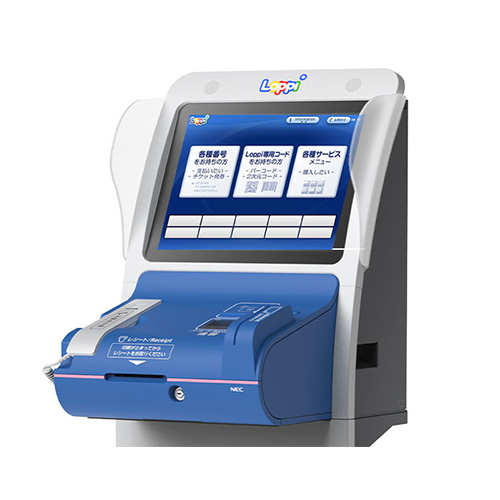
Loppi terminal

Loppi terminal

  1. Go to the remittance Application.
  2. Log in and select Top-Up money.
  3. Select the Konbini Pay option.
  4. Select Lawson Loppi Pay or Ministop Loppi Pay.
  5. Enter the amount you plan to deposit.
  6. Press continue.
You'll receive 2 codes: a Receipt number and a Confirmation number.
  1. Go to Lawson or Ministop and find the Loppi machine.
  2. Select the first option (enter number).
  3. Enter the Receipt number and press next.
  4. Enter the Confirmation number and press next.
  5. Check the name and deposit amount, then confirm.
  6. Take the receipt and pay it at the cashier.

Within 5 minutes, the balance will show in the Application. If not, refresh, or close and reopen the app and log in again.

If it still doesn't work, call our hotline after 10 minutes have passed since the payment.

04

Deposit by Pay-easy

~5 min
  1. Go to the remittance Application.
  2. Log in and select Top-Up money.
  3. Select the Pay-easy option.
  4. Enter the amount you plan to deposit.
  5. Press continue.
You'll receive 3 codes.
  1. Go to a Bank ATM or open your Bank Application.
  2. Check if it has the Pay-easy option.
  3. Select it and enter the 3 codes.
  4. In the ATM, choose Card or Cash. Cash: put the cash into the machine. Card: insert the card and deposit via your bank account.
  5. Confirm after your action.
  6. The screen will show our company name — Respect Payment Service — and your amount.
  7. Confirm and take the receipt.

Within 5 minutes, the balance will show in the Application. If not, refresh, or close and reopen the app and log in again.

If it still doesn't work, call our hotline after 10 minutes have passed since the deposit.

05

GMO Aozora Net Bank

~30 min
  1. Go to the remittance Application.
  2. Log in and select Top-Up money.
  3. Select the GMO Aozora Net Bank option.
  4. Enter the amount you plan to deposit.
  5. Press continue.
  6. You'll receive a unique virtual bank account number assigned to you — it stays the same every time, so save it once.
  7. Deposit from any bank to this account number.
Within 30 minutes, the money will appear in your App.
06

Pay By Bank

Auth each time

Link your Japanese bank account directly to Remittance APP.

Bank authentication is required every time you use this method.